Light/Dark preference test (adult zebrafish, larval zebrafish)


The preference for either dark or light environments is a behavioural trait seen across many species. Adult zebrafish exhibit an innate preference for dark environments (and avoidance of light environments). However, zebrafish larvae show an opposite preference for light environments. The light/dark preference test, for both larval and adult zebrafish, is a validated assay to assess anxiety-like behaviours, anxiolytic drug effects, and to investigate the (epi)genetic bases of anxiety-related behaviour.

Top

Experimental setup adult zebrafish

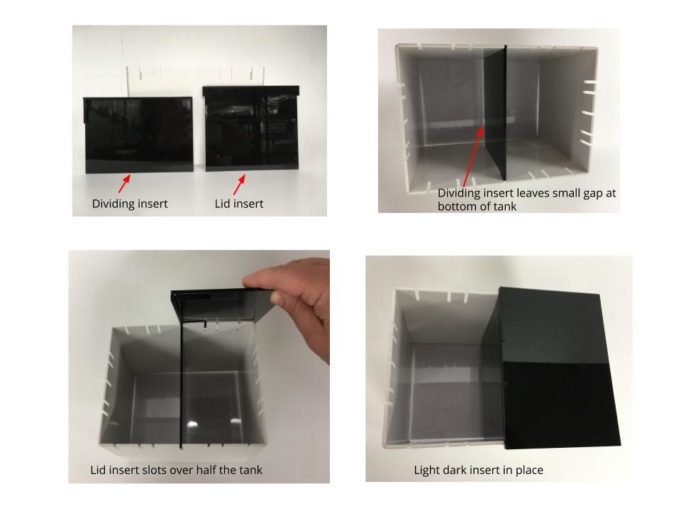
The Zantiks LT unit can be used for the light/dark preference assay in adult zebrafish. The dividing insert and the black lid are used to create the experimental environment in the supplied LT tank. The dividing insert splits the experimental tank in half to separate the 'dark' and 'light' environments and leave a shallow gap at the bottom for the fish to swim between the two. The lid can be alternated between trials to "randomise" the the dark zone when the overhead lights are turned on in the LT system.

LD box divider
Light/dark choice divider, splits the tank in half with a gap at the bottom for the fish to swim in between the two sidesEquipment for the light/dark choice assay in the Zantiks LT system
LD box lid
The lid can be placed on either side of the divider to determine which side remains dark when the overhead lights are turned on in the LT

Light stimulus

There are two options available for setting up the light stimulus.

  1. Overhead - When using the overhead lighting, the black lid blocks the white light creating the 'dark' environment on one side of the tank.
  2. Below - This is achieved via the built-in screen in the base of the LT system and is visible through the clear base of the tank. A rectangle of white light can be programmed to appear in one half of the tank.
Top

Experimental setup larval zebrafish

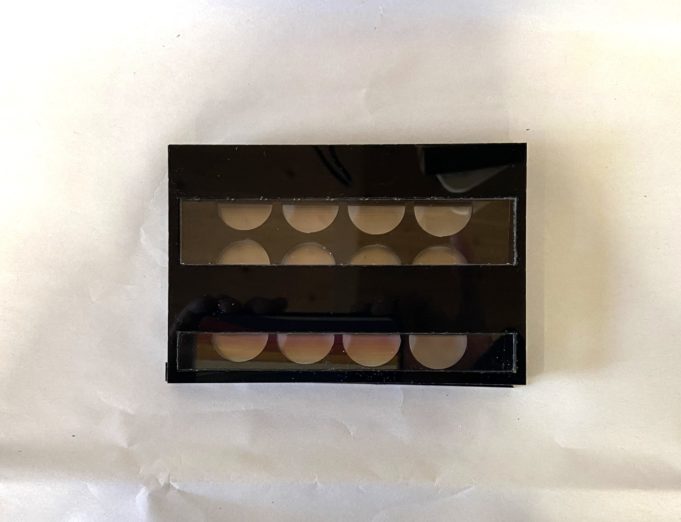
The Zantiks MWP unit can be used for the light/dark preference assay in larval zebrafish. The Zantiks light/dark bioassay plate is used to create two zones in each well. The bioassay plate is comprised of a black multi-well plate and 1-2 sets of covers (depending on the well plate size you are using). The covers have black and clear acrylic bands which create a light side and a dark side each each well when the overhead lights are turned on inside the MWP system. Turning the overhead lights off will cause both sides of the well to be dark. The black acrylic is infra red permeable meaning that animals can be tracked continuously no matter which half of the well they are in. 

The covers are placed both above and below the black multi-well plate. The 6- and 24-well plate have a second set of covers to switch around the light and dark zones within each well. The 12-well plate has one set of covers which can be rotated to change around the light and dark zones in each well. 

An individual larvae is placed in each well of the multi-well plate. The covers are placed both above and below the plate. This is then positioned on the light stand and then loaded into the MWP system.

12 well LD aquatic all
Components for 12-well light/dark bioassay plate
12 well LD both covers
12-well light/dark bioassay plate once animals have been loaded and covers attached

Light stimulus

There are two options available for setting up the light stimulus:

  1. Overhead - The overhead lighting can be used to deliver white light from above. The well plate cover blocks the light from one side of each well.
  2. Below - If you have white LEDs for the light stimulation stand, these can be used to deliver a brighter light than the overhead lighting from below. As with the lighting from above, the well plate cover blocks the light from one side of each well.
Top

Results / Data output

There are several parameters that are commonly used in the light/dark preference task for fish, including: time spent (secs) and distance moved (mm) in light and dark zones, latency to first enter the light zone and number of entries into the light zone. Zantiks units can be scripted to automatically process these variables.

Top

Protocol script download

Adult zebrafish

There is one script for the Light/Dark preference test for adult zebrafish. 

  1. light_dark_preference_LT.zs


To select the orientation of the light and dark zone you will need to make note of the zones asset for the Light/Dark preference assay. Zone 1 is always the purple zone, Zone 2 is always the green zone. You can can see the order that the zones are drawn in by watching the asset building script run from the live video, or by looking at the asset building Zanscript. 

The light/dark orientation is set in the adult light/dark preference script from the following DEFINE command 

DEFINE DARK_ZONE

Use 1 or 2 to define if the dark zone is in zone 1 or zone 2

Z LT LD
Zones asset for the Light/Dark choice assay in the LT. Purple is zone 1, green is zone 2. If the lid of the Light/Dark box is on the left of the tank, DEFINE DARK_ZONE should be set to 1 in the Zanscript. If the lid is on the right of the tank, DEFINE DARK_ZONE should be set to 2 in the Zanscript

Larval zebrafish

There is one script for the Light/Dark preference test for larval zebrafish. Within the script you will need to select the well-plate size that you are using between (6-, 12- or 24- wells). You will also need to select which orientation the light and dark zones are in the wells.

  1. light_dark_preference_MWP.zs


To select the orientation of the light and dark zones you will need to make note of the zones asset for the size multi-well plate being used. Below is an example with a 12-well plate. Zone 1 is always the purple zone, Zone 2 is always the green zone. You can can see the order that the zones are drawn in by watching the asset building script run from the live video, or by looking at the asset building Zanscript. In the example picture below, the covers have been oriented around the 12-well plate to make zone 1 (purple zone) dark. 

The well plate size and the light/dark orientation is set in the larval light/dark preference script from the following DEFINE commands

DEFINE NUM_WELLS 
DEFINE DARK_ZONE

Use 6, 12 or 24 to define the well size being used. Use 1 or 2 to define if the dark zone is in zone 1 or zone 2

12well light dark plate
Zones asset for the 12-well light/dark preference plate. Zone 1 is purple, zone 2 is green.
12 well LD zoomed
Plate covers over the 12-well plate. This orientation makes Zone 1 the dark zone and Zone 2 the light zone.

Asset

You will need to upload the appropriate assets into the Asset directory on your Zantiks Control Console and ensure the correct asset name is in the LOAD(ARENAS,"name_of_asset") and the LOAD(ZONES,"name_of_asset") command in the script.

See the Calibrating your Zantiks unit page and Asset building in the MWP unit page or Asset building in the LT unit page for details on how to create assets customised to your set up.

Top